

FileZilla Pro - FTP and Cloud
Discover FileZilla Pro - FTP and Cloud. Read our in-depth review of this powerful macOS transfer tool for reliable FTP, SFTP, and multi-cloud management.
Why FileZilla Pro - FTP and Cloud Redefines Multi-Cloud Management
FileZilla Pro - FTP and Cloud sets itself apart from standard transfer clients by acting as a universal bridge between your local storage and virtually any remote server or cloud network. Developed by Business Follows srl, this premium utility elevates the trusted open-source foundation into a highly secure, commercial-grade powerhouse designed specifically for macOS users who manage complex file transfer workflows daily.
Unmatched Protocol Support for Developers and IT Pros
While many alternative clients restrict you to basic server types, this software excels by packing an exhaustive list of supported storage providers into a single, cohesive workspace. Whether you are updating a legacy server or push-syncing to modern container storage, the app handles it effortlessly.
- Traditional Server Protocols: Secure connections via FTP, FTPS, and SFTP.
- Enterprise Cloud Integration: Direct access to Amazon S3, Microsoft Azure Storage, Google Cloud Storage, and OpenStack Swift (Keystone v2).
- Everyday Productivity Clouds: Seamless syncing with Dropbox, Google Drive, Microsoft OneDrive, Box, and WebDAV.
- Niche Storage Solutions: Backblaze B2 support for cost-effective backups.
Advanced Site Management and Enhanced Security
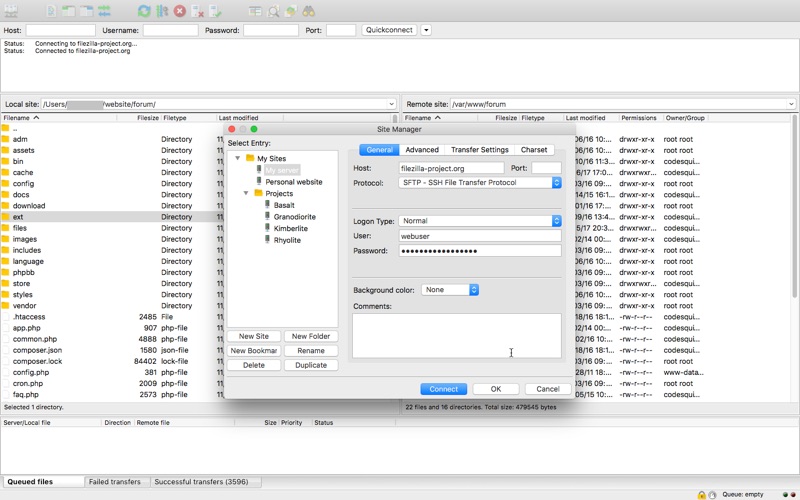
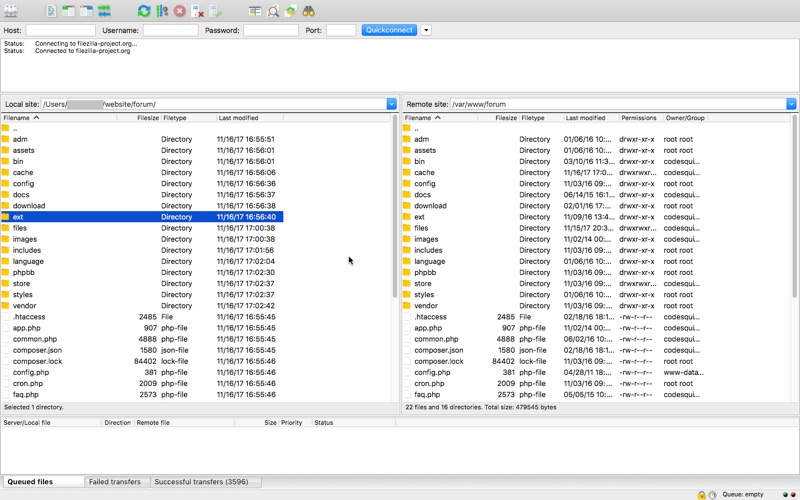
Organizing a vast portfolio of web properties is simplified through an integrated Site Manager. It features secure credential synchronization across multiple Mac devices using strong cryptography, ensuring your sensitive login keys remain protected. Navigating chaotic server directories is made easy with intelligent directory listing filters, directory comparison highlights, and synchronized local-to-remote directory browsing.
High-Volume Queue Management
The transfer queue is engineered to process millions of files without performance degradation. With no file size limitations, you can queue massive datasets via drag-and-drop or use the context menu to edit remote files directly in your preferred external editor. Additionally, configurable speed limits ensure that high-bandwidth uploads do not saturate your entire network connection.
Who Is This Professional Client For?
This application is highly recommended for web developers, system administrators, and content creators working on macOS. Its clean, tabbed user interface, support for over 50 languages, full IPv6 compatibility, and robust proxy support (HTTP/1.1, SOCKS5) make it an indispensable asset for enterprise-level deployment.
Conclusion and Official Store Access
If you are looking to streamline your cloud storage and server transfers into one reliable, secure application, this utility is an outstanding choice. To explore subscription plans, start your 7-day free trial, or read user feedback, visit the official Apple App Store listing today.